Know who's in today, without a register
A simple attendance app for small businesses. Staff check in and out from their phone or the web, managers see the whole team on one board, and hours add up into timesheets you can download.
- Free in early access
- No card needed
- Web and mobile
Why teams use Attendance
Check in, check out and see who's working
One tap to check in
No biometric machine and no paper register. Staff check in and out on their phone and see their hours tick up.
See the team at a glance
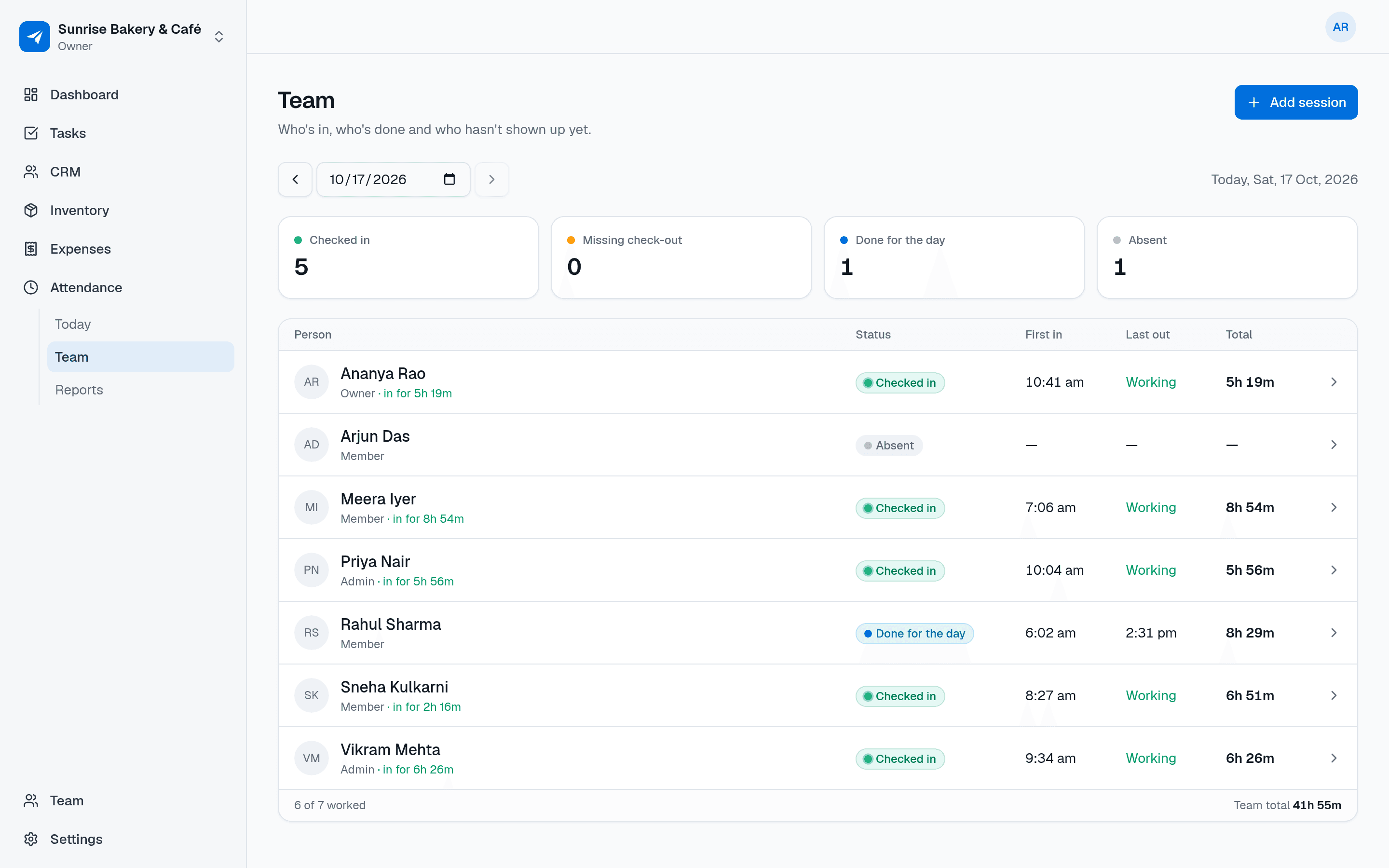
The team board shows who's checked in, who's done for the day, who's absent and who forgot to check out.
Timesheets without the maths
Pick a period and get hours per person, ready to download as a CSV for your salary sheet.
Features
Everything in Attendance
Everything below is included for your whole team, free during early access.
Check in and check out
From the mobile app or the web, with an optional note. Members can see their own sessions and hours.
Live timer
While someone is checked in, a running timer shows how long they've been working today.
Missing check-out recovery
Forgot to check out? Nothing is guessed. The person enters when they actually left, and it's recorded as a late check-out.
Team board
Admins see everyone's status for today or any past date: checked in, done, absent or missing a check-out.
Admin corrections
Admins can add, edit or delete a session. Each change records who made it and when.
Timesheet reports with CSV
Hours per person over any period of up to three months, with a CSV download.
Your workspace time zone
“Today” and every time shown follow your business's time zone, wherever your staff happen to be.
Use cases
How small businesses use Attendance
A retail store replaces the paper register: staff check in on their phone when they open up.
A restaurant manager glances at the team board before service to see who's in.
A cleaning company's on-site staff check in from the job and the office sees their hours.
An owner downloads last month's hours as a CSV to work out salaries.
An admin fixes a forgotten check-out from yesterday, and the edit is recorded.
Also on mobile
Check in from the phone in their pocket
Attendance works in the NextFly EMS mobile app as well as on the web, with the same data and the same permissions.
- Check in and out with one tap
- Watch today's hours on a live timer
- Enter a forgotten check-out time
- Admins see the team board on the go
Works with
Independent, but better together
Attendance works perfectly on its own. Switch on another module whenever you need it — they share your team and settings, and nothing about Attendance changes.
FAQ
Attendance questions, answered
Is this a good attendance app for a small business in India?
It's built for small teams: staff check in and out from their phone, managers see who's in, and hours become timesheets. Times follow your workspace time zone, such as India Standard Time.
Do staff need a biometric device?
No. Staff use the NextFly EMS mobile app or a web browser to check in and out.
What if someone forgets to check out?
Their session shows as missing a check-out. They can enter the time they actually left, or an admin can correct it. Nothing is closed automatically.
Can admins edit attendance?
Yes. Admins and the owner can add, edit and delete sessions for anyone. The session records who last edited it and when.
Does it calculate salaries?
No. Attendance gives you accurate hours per person and a CSV download. Salaries are worked out the way you do today.
What does it cost?
NextFly EMS is free during early access, with every module included and no card needed.
Try Attendance with your team this week
Create your workspace in a minute and switch on just this module, or book a demo and we'll set it up with you.