Know who is doing what, and what's late
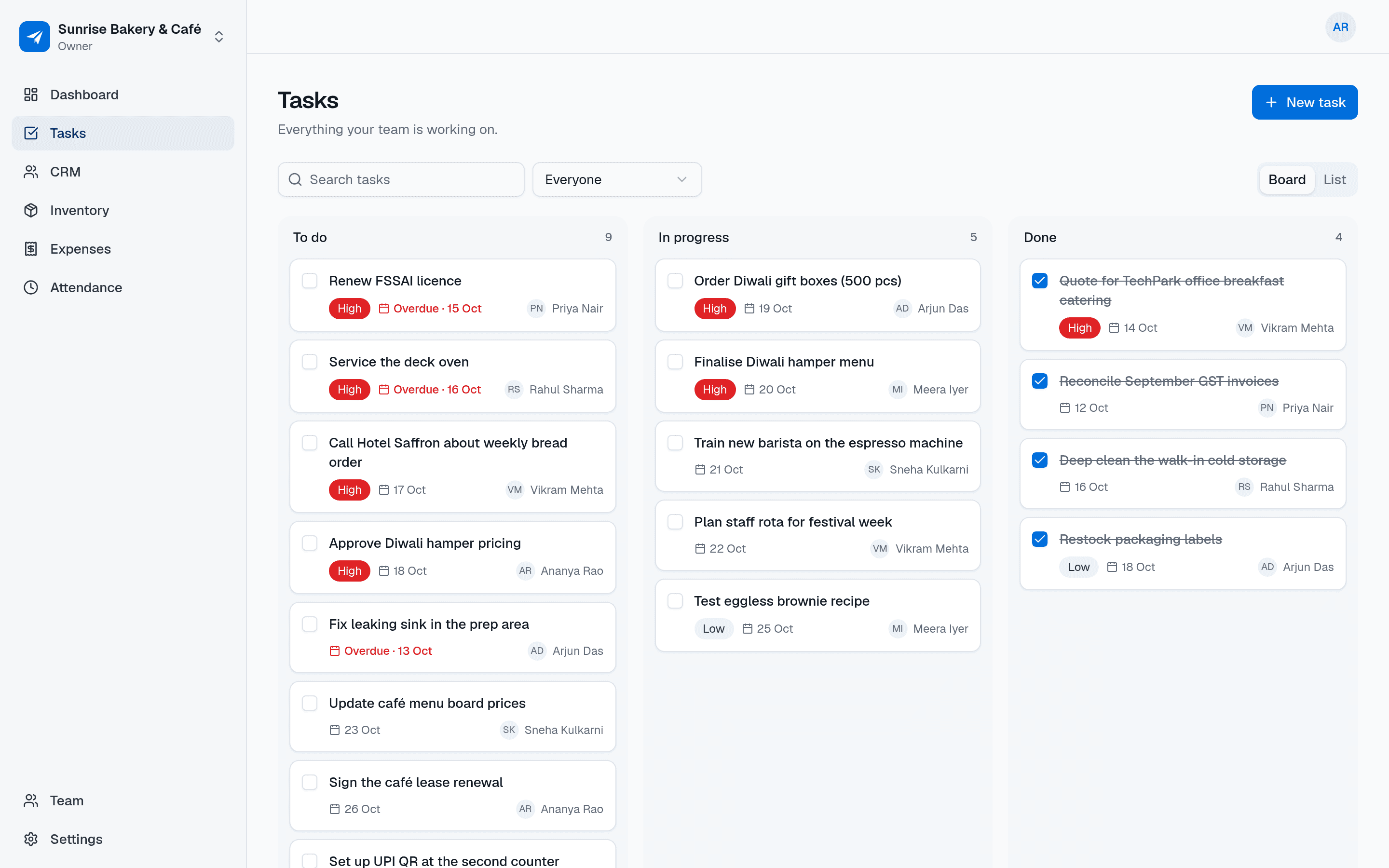
A shared task board for small teams. Assign work, set a priority and a due date, talk it through in comments and see progress at a glance — without chasing people on WhatsApp.
- Free in early access
- No card needed
- Web and mobile
Why teams use Tasks
Assign work, set due dates and see what's done
Nothing falls through the cracks
Every job has an owner and a due date. Overdue work is marked in red, so you spot it before a customer does.
Fewer follow-up calls
Questions and updates live in the task's comments, not scattered across chats. Anyone can catch up in seconds.
Your team actually uses it
Three columns, one button to add a task. No training, no project-management jargon.
Features
Everything in Tasks
Everything below is included for your whole team, free during early access.
Board and list views
Columns for To do, In progress and Done, or switch to a simple list when you have a lot on.
Assign to anyone on the team
Give each task to one person, or leave it unassigned for whoever picks it up first.
Priorities and due dates
Mark work as low, medium or high priority and set the day it's due.
Overdue highlighting
Tasks past their due date and not yet done are flagged as overdue, on the web and on mobile.
Comments on every task
Discuss the details, share an update or ask a question right where the work is.
Filters that matter
See only your tasks, unassigned tasks or one person's work, and search by title.
Sensible permissions
Everyone can see and create tasks. The creator, the assignee or an admin can change one; admins can tidy up anything.
Use cases
How small businesses use Tasks
A shop owner hands out the day's jobs — restocking, cleaning, deliveries — and checks the board at closing time.
An agency tracks client deliverables with due dates so nothing slips past a deadline.
A field-service manager assigns site visits and technicians mark them done from their phone.
A café keeps its opening and closing checklist as tasks that the shift team ticks off.
A founder replaces sticky notes and WhatsApp reminders with one list the whole team can see.
Also on mobile
Tasks go wherever your team goes
Tasks works in the NextFly EMS mobile app as well as on the web, with the same data and the same permissions.
- See the tasks assigned to you
- Move a task to in progress or done
- Read and add comments on the spot
- Overdue tasks stand out in red
Works with
Independent, but better together
Tasks works perfectly on its own. Switch on another module whenever you need it — they share your team and settings, and nothing about Tasks changes.
FAQ
Tasks questions, answered
Is this a full project-management tool?
No, on purpose. Tasks is a shared to-do list with a board, assignees, priorities, due dates and comments. It covers day-to-day work for small teams without Gantt charts or setup.
Can my staff update tasks from their phone?
Yes. The NextFly EMS mobile app shows each person the tasks assigned to them, lets them move a task along and add comments.
Who can edit or delete a task?
The person who created a task and the person it's assigned to can edit it. Deleting is for the person who created it. Admins and the owner can edit or delete any task in the workspace.
How do I see what's overdue?
Any task that isn't done and is past its due date is labelled overdue in red, so it stands out on the board and in the list.
Can a task have more than one assignee?
Each task has one assignee so it's always clear who is responsible. Split bigger jobs into a few tasks if several people are involved.
What does it cost?
NextFly EMS is free during early access, with every module included and no card needed.
Try Tasks with your team this week
Create your workspace in a minute and switch on just this module, or book a demo and we'll set it up with you.