Never forget to follow up with a customer again
A simple CRM for small businesses. Keep every lead and customer in one place, log each call on a timeline, set follow-up dates and move deals from first enquiry to won.
- Free in early access
- No card needed
- Web and mobile
Why teams use CRM
Keep track of customers, leads and deals
Follow-ups that actually happen
Give every contact a next follow-up date. Anyone due today or earlier is flagged, so warm leads don't go cold.
See your sales at a glance
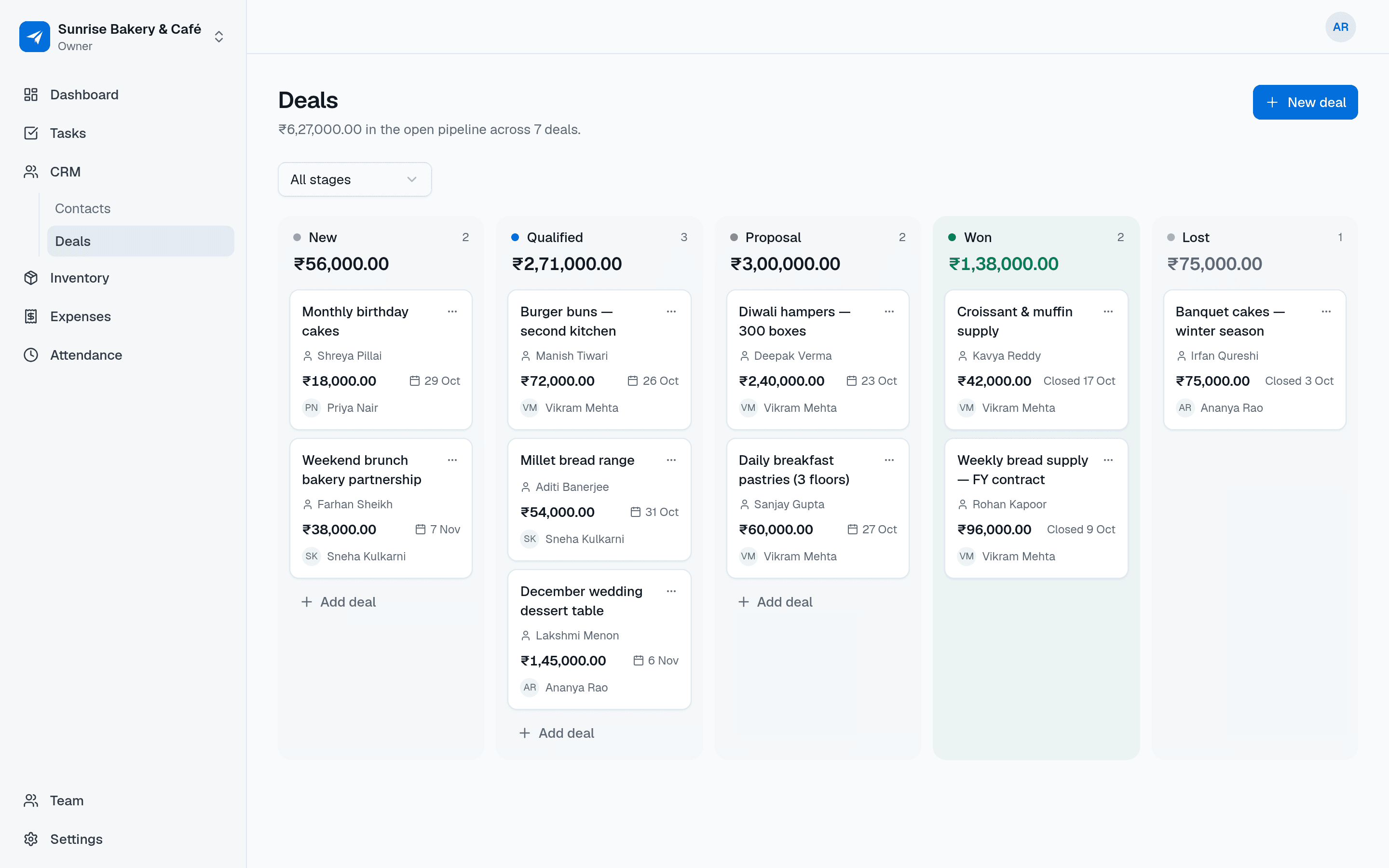
Deals sit in a clear pipeline with their value, so you know what's likely to close this month.
Customer history stays with the business
Calls and notes are saved on the contact, not in one salesperson's phone. When someone leaves, the history doesn't.
Features
Everything in CRM
Everything below is included for your whole team, free during early access.
Contacts with status
Name, phone, email, company and notes, marked as lead, customer or inactive.
Owners for every record
Each contact and deal has an owner. Reassign them when someone changes role or leaves.
Follow-up dates
Set the next date to get in touch and filter to everyone you need to call today.
Deal pipeline
Move deals through New, Qualified, Proposal, Won and Lost, with a value and expected close date on each.
Notes timeline
Log calls, meetings and messages on the contact, linked to a deal when it's relevant.
Members see their own records
Salespeople see the contacts and deals they own, plus unassigned ones. Admins see and reassign everything.
Tap to call, WhatsApp or email
On the mobile app, reach a contact in one tap, then add a note about the conversation.
Search and filters
Find anyone by name, filter by status or owner, and narrow deals by stage.
Use cases
How small businesses use CRM
A consultancy tracks enquiries from first call to signed proposal, with a value on each deal.
A distributor's sales team logs every visit to a retailer and sets the date of the next one.
A boutique keeps its regular customers' numbers and notes in one list instead of a phone's contacts.
An owner checks the pipeline every Monday to see what's in proposal and what was won last week.
A sales rep on the road calls a lead from the app and notes what was agreed straight after.
Also on mobile
Your customers, one tap away
CRM works in the NextFly EMS mobile app as well as on the web, with the same data and the same permissions.
- Call, WhatsApp or email a contact in one tap
- Log a note straight after the conversation
- See who is due for a follow-up today
- Update a contact's status and next follow-up date
Works with
Independent, but better together
CRM works perfectly on its own. Switch on another module whenever you need it — they share your team and settings, and nothing about CRM changes.
FAQ
CRM questions, answered
Is NextFly EMS CRM suitable for a very small team?
Yes. It's built for teams of a few people up to a few dozen: contacts, follow-up dates, a five-stage pipeline and a notes timeline, without the setup a large CRM needs.
Can my salespeople see each other's customers?
Members see the contacts and deals they own and any that are unassigned. Admins and the owner see everything and can reassign records.
Does it remind me to follow up?
Each contact can have a next follow-up date. Contacts that are due today or overdue are flagged in the app and you can filter to just those.
Can I call or WhatsApp customers from the app?
Yes. On the mobile app you can call, WhatsApp or email a contact with one tap, then add a note to their timeline.
What currency are deal values in?
Your workspace currency, such as rupees, dirhams or dollars, which you choose when you set up.
Try CRM with your team this week
Create your workspace in a minute and switch on just this module, or book a demo and we'll set it up with you.