Staff expense claims, approved in a tap
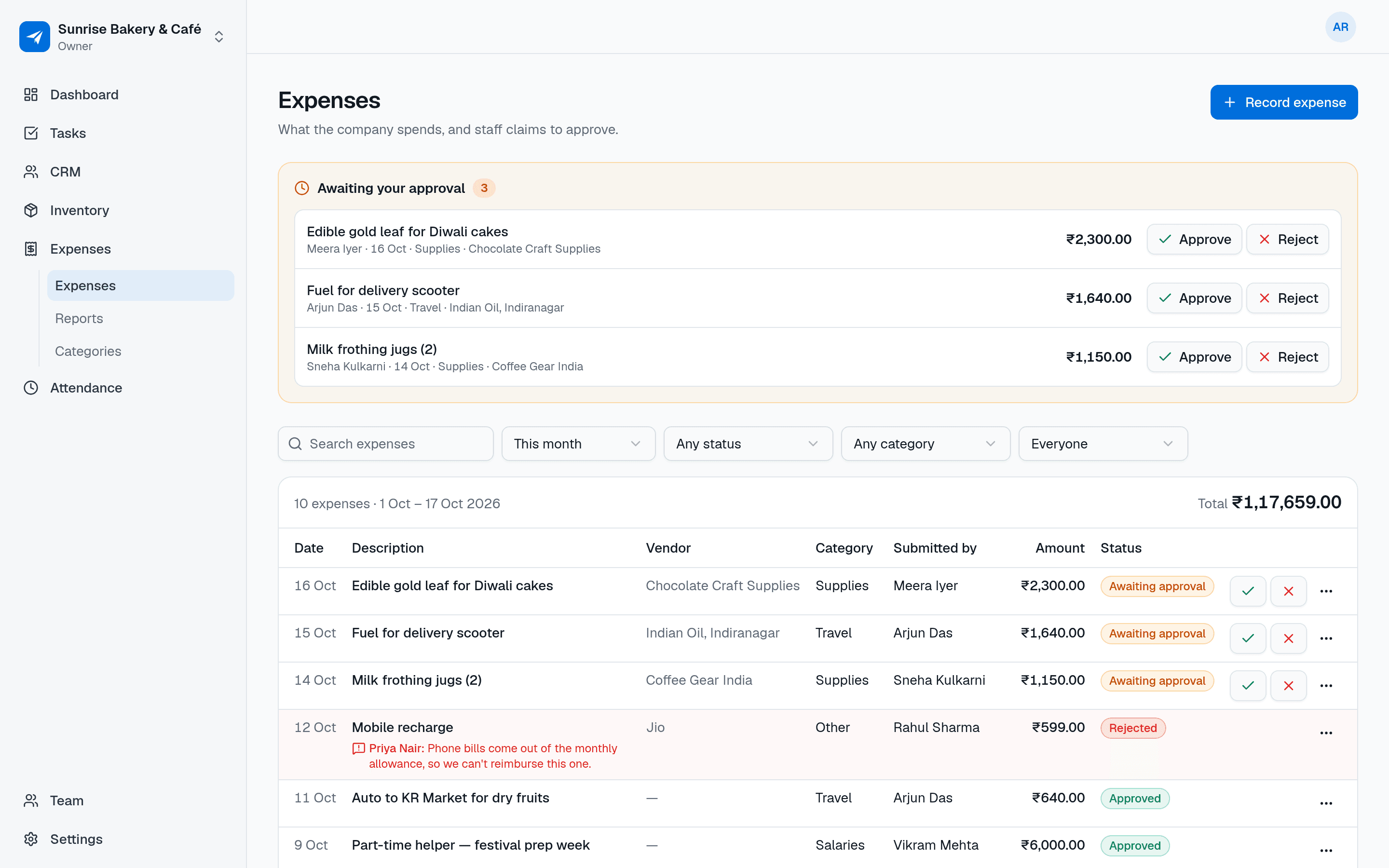
Record what the business spends and let staff submit their claims. Admins approve or reject with a note, and reports show where the money went by category and month.
- Free in early access
- No card needed
- Web and mobile
Why teams use Expenses
Record spending and approve staff claims
No more claims on scraps of paper
Staff submit expenses from their phone or the web, with the date, amount, category and vendor. Nothing gets lost.
Clear yes or no
Approve with one tap or reject with a reason. The person sees why, fixes it and resubmits.
Know where the money goes
Reports break down approved spending by category and by month, so you can see what's growing.
Features
Everything in Expenses
Everything below is included for your whole team, free during early access.
Quick expense entry
Date, amount, category, description and an optional vendor. That's the whole form.
Approval workflow
Staff expenses wait for approval. Admins approve or reject them, and a rejection always comes with a note.
Edit and resubmit
A rejected expense can be corrected by the person who submitted it, which sends it back for approval.
Admins are auto-approved
When an admin or the owner records an expense, it's approved straight away. No approving your own claims.
Your own categories
Start with Travel, Supplies, Utilities, Rent, Salaries, Marketing, Meals and Other, then rename, add or archive.
Reports by category and month
Pick a date range of up to a year and see totals per category and per month, with a click through to the expenses.
Filters and search
Narrow by date, status, category or person, and search descriptions and vendors.
Use cases
How small businesses use Expenses
A field technician submits fuel and parts expenses from the road and gets them approved the same day.
An owner reviews pending claims each evening and approves or rejects them from their phone.
An agency records software, travel and client-meeting costs and checks spending by category each month.
A café logs daily purchases from vendors to see what it spends on supplies versus utilities.
An accountant-minded founder replaces the expenses spreadsheet with one shared, approved list.
Also on mobile
Claims from wherever the money was spent
Expenses works in the NextFly EMS mobile app as well as on the web, with the same data and the same permissions.
- Submit an expense in a few seconds
- See whether it's approved or why it was rejected
- Admins approve or reject pending claims
- Fix a rejected claim and resubmit it
Works with
Independent, but better together
Expenses works perfectly on its own. Switch on another module whenever you need it — they share your team and settings, and nothing about Expenses changes.
FAQ
Expenses questions, answered
How does expense approval work?
Members submit expenses, which show as awaiting approval. An admin or the owner approves or rejects them. Rejections need a note, and the submitter can edit and resubmit.
Do admins need approval for their own expenses?
No. Expenses recorded by admins and the owner are approved automatically.
Can staff see everyone's expenses?
Members see the expenses they submitted. Admins and the owner see everyone's and can approve them.
Can I change the expense categories?
Yes. Admins can add, rename and archive categories. Archived categories stay on past expenses.
Does it reimburse staff or handle payroll?
No. Expenses records and approves spending. Paying people back is done the way you already do it.
Try Expenses with your team this week
Create your workspace in a minute and switch on just this module, or book a demo and we'll set it up with you.